

Gym API Integrations: A Complete Implementation Guide

Gym API integrations connect your member system, payment processor, access control hardware, wearables, and marketing stack so data flows automatically between them instead of sitting in silos. The single best first action: inventory every system you currently run, identify which ones expose a REST API or webhooks, and decide whether each connection needs real-time sync or a nightly batch. Your CTO, lead developer, or an integration partner should own that discovery call before any code gets written.
Common integration targets include:
- Member/CRM platform — member create, update, cancel, and merge events
- Payment processor — charge, refund, subscription renewal, and failed-payment events
- Class scheduling and booking — booking created, waitlist promoted, class canceled
- Access control and turnstiles — check-in and check-out events, RFID/credential validation
- Wearables and fitness devices — workout summaries, heart rate, activity telemetry
- Email, SMS, and marketing automation — contact sync, tag updates, campaign triggers
- Analytics and data warehouse — aggregated member behavior, revenue, and retention metrics
If your team lacks API experience, bring in an integration partner for the discovery phase. The architecture decisions made in week one are the hardest to reverse later.
Key Takeaways
Gym API integrations succeed when you sequence by business value, pick the lowest-coupling pattern that meets each service-level need, and treat every integration as a product with contracts, monitoring, and a rollback plan.
PointDetails
Inventory first
Map every system, owner, and data object before writing any code.
Match pattern to need
Use webhooks for member events, sync REST for access control, queues for multi-system fan-out.
Sandbox before production
Validate every connector against sandbox credentials and run contract tests on each pull request.
Stage the rollout
Run a canary at one location for at least one week before expanding to all sites.
Joinfitnessflow
Provides a developer API, sandbox, webhooks, and migration support for gyms moving off legacy platforms.
Table of Contents
- What are gym API integrations and why do they matter?
- What integrations do gyms typically build first?
- How should you handle authentication and security?
- Which integration patterns actually work in production?
- What does a gym API integration rollout look like step by step?
- How do you keep integrations stable as APIs change?
- How does Fitness Flow handle API integrations and migrations?
- What experienced integration teams get wrong
- Joinfitnessflow connects your gym stack without the integration headache
- Sources
- FAQ
What are gym API integrations and why do they matter?
A gym API integration is a programmatic connection between two or more software systems that exchanges structured data, typically member records, scheduling events, payment transactions, or device telemetry, without manual exports or copy-paste workflows. The systems speak to each other directly, usually over REST endpoints or webhook callbacks.
The business case is straightforward. Every manual export is a delay and a potential error. A member who cancels online but whose access badge still works for three days is a security and billing problem. A marketing automation tool that only syncs contacts nightly misses the window to send a re-engagement message while a lapsed member is still thinking about coming back.
Three operational outcomes drive most gym integration projects:
- Reduced manual work. Staff stop exporting CSVs, re-keying data, and reconciling mismatches between systems. Automating member sync alone can reclaim hours per week at a busy multi-location gym.
- Consistent member experience. A member who books a class, pays via the app, and walks through a turnstile should never hit a friction point caused by systems that don’t know about each other.
- Operational visibility. When check-in events, payment events, and booking events all flow into a single analytics layer, you can see retention signals in near-real-time rather than waiting for a monthly report.
The risks of not integrating are equally concrete. Tightly coupled batch jobs create fragile fitness platforms where a single vendor change triggers a full regression cycle. Vendor lock-in deepens when your data lives only inside one system’s proprietary export format. And night-batch delays mean your team is always operating on yesterday’s picture of the business.
What integrations do gyms typically build first?
The table below maps the most common integration targets to the data objects they exchange and the typical sync frequency. Frequency is a design choice, not a vendor default — but these reflect what most production gym stacks actually run.
Integration targetCommon objects exchangedTypical frequency
Membership/CRM
Member create, update, cancel, merge
Real-time (webhook)
Billing/payments
Charge, refund, failed payment, subscription renewal
Real-time (webhook)
Class scheduling
Booking created, waitlist promoted, class canceled
Near-real-time
Access control/turnstiles
Check-in, check-out, RFID credential sync
Real-time
Wearables/fitness devices
Workout summary, heart rate, activity segments
Near-real-time or batch
Marketing automation
Contact sync, tag updates, campaign triggers
Near-real-time
Analytics/data warehouse
Aggregated events, revenue, retention metrics
Batch (hourly or nightly)
Membership and CRM is almost always the first integration because every other system depends on knowing who a member is. The typical payload is a member object with an ID, status, tier, and contact fields. EGYM’s MMS API v2 is a good reference for what a modern gym management API exposes: REST endpoints for member account management, real-time visit tracking, webhook subscriptions, and location-specific authentication.
Access control is the integration with the highest operational stakes. A check-in event needs to resolve in under a second or the turnstile queue backs up. That latency requirement rules out polling and points directly to webhook push or a local cache with periodic sync.

Wearables and fitness devices are increasingly part of the member value proposition. Google Fit’s REST API lets apps store and read fitness and wellness data in a cross-platform fitness store, making it a practical option for ingesting device telemetry from members who use Android wearables. Apple HealthKit covers the iOS side. The key design question is consent: members must explicitly authorize data sharing, and that authorization needs to be revocable.
Booking platforms deserve a special note. When a scheduling tool lacks a usable API, a safe fallback is scheduled exports or monitored browser automation that keeps downstream pipelines identical and makes the eventual switch to an official API much easier. Don’t build custom downstream logic around a workaround schema.
How should you handle authentication and security?
For production server-to-server connections, prefer OAuth2 client credentials or short-lived service tokens over long-lived static API keys. Static keys that never rotate are a liability: one leaked key in a config file or a log gives an attacker persistent access.
Here is a practical auth pattern checklist ordered by use case:
- OAuth2 client credentials — server-to-server integrations where no user is present (billing sync, CRM sync, analytics pipelines). Short-lived access tokens, refresh automatically.
- OAuth2 authorization code + PKCE — integrations that act on behalf of a specific member or trainer (wearable consent flows, personal trainer app access). Requires user interaction once; tokens are scoped to that user.
- Location-specific API keys — multi-location gym stacks where each site needs isolated credentials. EGYM’s MMS API v2 uses this pattern, issuing per-location keys so a breach at one site doesn’t expose the whole chain.
- Signed webhooks — any inbound webhook endpoint. Verify the HMAC signature on every request before processing. Reject unsigned or mismatched payloads immediately.
- Service accounts with least-privilege scopes — internal automation that needs read access to member data but should never touch billing. Scope the token to exactly the endpoints it needs.
Security practices that belong in every integration:
- Store secrets in a secrets manager (AWS Secrets Manager, HashiCorp Vault, or equivalent) — never in environment variables committed to source control.
- Build a credential rotation playbook before you go to production. Know exactly which systems need updating when a key rotates and automate it where possible.
- Implement disconnect and revoke flows. When a member revokes wearable consent or a location is offboarded, tokens must be invalidated immediately.
- Log auth failures with correlation IDs. A spike in 401s is often the first signal of a misconfigured rotation or a compromised credential.
Compliance considerations depend on what data you’re handling. PCI DSS applies the moment card data touches your systems — use a payment processor’s tokenization so raw card numbers never reach your servers. GDPR applies to any EU member data, including the right to erasure and data portability. HIPAA is triggered when your integrations handle protected health information, which workout telemetry from a device can qualify as depending on how it’s collected and stored. When in doubt, treat biometric and health data as HIPAA-adjacent and apply the same controls.
Pro Tip: Write and test your credential-rotation runbook in staging before production launch. A rotation that takes four hours under pressure because no one documented the steps is a four-hour outage window.
Which integration patterns actually work in production?
The core principle, drawn from ThinkBot’s Integration Engineering Playbook, is to use the lowest-coupling pattern that meets the business need. Synchronous REST calls for decisions that need an immediate answer; async event-driven patterns for state propagation that can tolerate a few seconds of lag.
Direct REST (synchronous) works for access control decisions and payment authorization where you need a yes/no answer before the next step. The tradeoff is tight coupling: if the downstream service is slow or down, your caller waits or fails.
Webhook push is the right default for most member and booking events. The provider calls your endpoint when something happens. You process it asynchronously and return a 200 quickly. EGYM recommends combining push and pull for bidirectional sync: push for immediate updates, pull for periodic reconciliation.
Polling is a fallback, not a first choice. It wastes quota, adds latency, and scales poorly. Use it only when the vendor offers no webhooks and a scheduled export isn’t available.
Event-driven with a message queue (SQS, RabbitMQ, or similar) decouples producers from consumers entirely. A member-canceled event lands in a queue; your CRM, access control, and marketing systems each consume it independently. This is the right pattern for multi-system fan-out and for modernizing legacy fitness platforms without rewriting them.
Hub-and-spoke with a canonical data model is the architecture that pays off at scale. Instead of point-to-point connections between every pair of systems, each system speaks to a central integration layer using a shared member schema. Adding a new system means writing one adapter, not N new connectors.
PatternBest forKey tradeoff
Direct REST
Access control, payment auth
Tight coupling, latency risk
Webhook push
Member events, booking changes
Requires reliable endpoint, retry logic
Polling
No-webhook vendors
Quota waste, higher latency
Message queue
Multi-system fan-out, legacy wrap
Operational complexity, needs DLQ
Hub-and-spoke
Multi-vendor, multi-location stacks
Upfront schema design cost
Resilience patterns you must implement regardless of which topology you choose:
- Idempotency keys on every write operation. Retries happen; duplicate processing shouldn’t.
- Exponential backoff with jitter on retries. Synchronized retries after a failure spike make the problem worse.
- Dead-letter queues (DLQs) for messages that fail repeatedly. Alert on DLQ depth; don’t let failed events disappear silently.
- Circuit breakers to stop hammering a degraded downstream service.
- Correlation IDs on every request so you can trace a member event across five systems in your logs.
For API performance tuning under load, monitor p95 latency, error rates, and 429 (rate-limited) responses as your primary health signals.
What does a gym API integration rollout look like step by step?
Follow a staged rollout. Skipping stages to ship faster is how you end up with a production incident that corrupts member records.
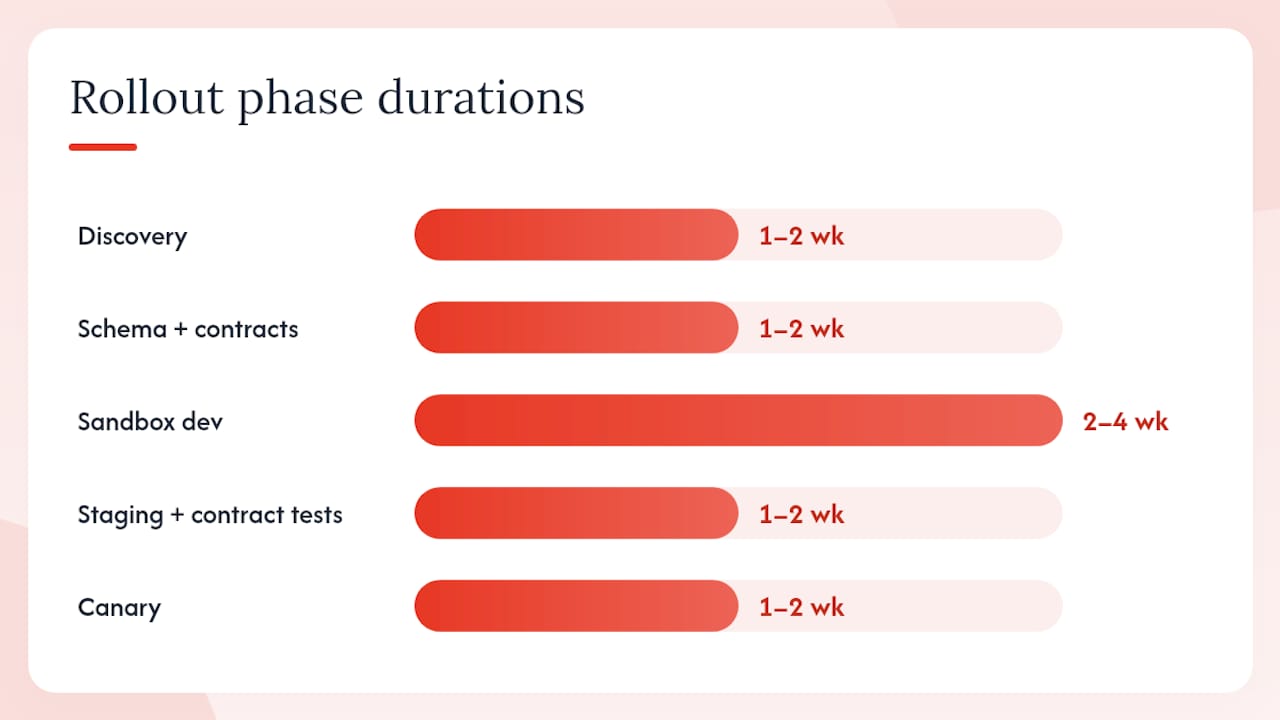
- Discovery (week 1). Inventory every system, identify the technical owner for each, map the data objects each system owns, flag all PII and consent fields, and rank endpoints by business value. Access control and billing rank highest; analytics can wait.
- Data contracts and schema design (week 1–2). Define your canonical member schema. Document what each system calls the same field (member ID, external ID, customer ID — pick one canonical name). Agree on null handling and enum values before writing a line of code.
- Sandbox connectors (weeks 2–4). Build connectors against vendor sandbox environments. Every major gym management API should offer sandbox credentials and test data. If a vendor has no sandbox, treat that as a red flag and plan for extra staging time.
- Contract tests (weeks 3–5). Write consumer-driven contract tests that verify your connector handles the payloads the vendor actually sends, including edge cases like missing fields and unexpected enum values.
- Staging rollout with synthetic data (weeks 5–6). Deploy to a staging environment that mirrors production topology. Run end-to-end tests. Verify webhook delivery, retry behavior, and DLQ alerting.
- Canary release (weeks 6–7). Enable the integration for a single location or a single membership tier with real users. Monitor error rates, DLQ depth, and member-visible friction for at least one full week before expanding.
- Full production rollout and monitoring (week 8+). Expand to all locations. Keep the rollback path documented and tested. Set alerts on 5xx rates, 429 rates, and DLQ depth from day one.
PhaseDurationOwnerAcceptance criteria
Discovery
1–2 weeks
Technical lead
System inventory complete, PII flagged
Schema + contracts
1–2 weeks
Developer + ops
Canonical schema approved, contracts documented
Sandbox dev
2–4 weeks
Developer
All connectors passing sandbox tests
Staging + contract tests
1–2 weeks
QA + developer
Zero contract violations, retry logic verified
Canary
1–2 weeks
Technical lead
Error rate below threshold, no member-visible issues
Full rollout
Ongoing
Ops + developer
Monitoring alerts live, rollback plan tested
Cost drivers to budget for: engineering hours (the largest variable), middleware or iPaaS subscription fees if you use a platform like Zapier or Make for simpler connections, security and compliance review time, and monitoring tooling. A straightforward two-system integration (CRM plus payments) typically takes two to four weeks of developer time. A full hub-and-spoke architecture across six systems is a three-to-six-month project.
How do you keep integrations stable as APIs change?
Vendor APIs change. The question is whether that change breaks your integration silently or loudly.
Versioning strategies that protect you:
- Require versioned endpoints from every vendor (
/v2/members, not/members). Never call an unversioned endpoint in production. - Write API adapters that translate vendor responses into your canonical schema. When a vendor changes a field name, you update one adapter, not every downstream consumer.
- Use consumer-driven contract tests so you know immediately when a vendor’s sandbox response diverges from what your code expects.
- Ask vendors for migration windows and deprecation notices. A responsible vendor gives at least 90 days’ notice before removing an endpoint.
Rate-limit handling is where many integrations fail under load. Honor the Retry-After header when you receive a 429. Implement exponential backoff with jitter — not a fixed sleep — so a burst of retries doesn’t create a synchronized thundering herd. Calculate your quota headroom: if a vendor allows 1,000 requests per minute and your peak check-in volume is 800 per minute, you have almost no buffer for retries.
Testing checklist for stable integrations:
- Unit tests for every data mapper and transformer
- Contract tests against the vendor sandbox, run on every pull request
- End-to-end staging tests that cover the full event lifecycle (member created → check-in → charge → marketing tag applied)
- Load tests that mirror expected peak usage, not average usage
- Synthetic monitoring that fires a test webhook every five minutes and alerts if delivery fails
- Set up synthetic checks for webhook delivery latency and success rate.
- Alert on elevated 5xx or 429 error rates — not just on total failures.
- Build replay tooling for your DLQ so failed events can be reprocessed without manual intervention.
- Review vendor changelogs monthly and subscribe to their developer mailing lists.
- Run a quarterly “chaos day” where you simulate a vendor outage and verify your circuit breakers and fallback paths work.
How does Fitness Flow handle API integrations and migrations?
Joinfitnessflow is built with integrations as a first-class concern, not an afterthought. The platform exposes a developer API with sandbox access, webhooks for member and event notifications, service accounts, and single-tenant API keys for multi-location deployments. The canonical data model covers members, bookings, billing, check-ins, and device telemetry, so connectors you write against Joinfitnessflow’s schema don’t need to be rewritten when you add a new downstream system.
Migration support is where Joinfitnessflow separates itself from platforms that hand you a data export and wish you luck. The migration toolkit includes:
- Data mapping assistants that translate legacy field schemas into the Joinfitnessflow canonical model
- Sandbox environment with test credentials so you can validate connectors before touching production data
- Expert migration support for scoping, data validation, and cutover planning
- Webhook migration guides for teams moving from batch-based legacy systems to event-driven patterns
A typical migration path looks like this: a gym running a legacy booking system with nightly batch exports moves to Joinfitnessflow’s event-driven webhooks. The integration team maps the legacy member schema to the canonical model, validates the mapping in sandbox, runs a parallel period where both systems write member records, then cuts over access control and billing to the new event stream. Batch delays that previously ran 8–12 hours drop to under 30 seconds for check-in events. Marketing automation triggers fire within minutes of a booking instead of the next morning.
To request API documentation, sandbox credentials, or schedule a migration scoping call, visit Joinfitnessflow. For operators evaluating whether to migrate from a legacy platform, the gym management software comparison covers the tradeoffs in detail.
What experienced integration teams get wrong
The most common mistake is prioritizing the technically interesting endpoints over the business-critical ones. Teams spend three weeks perfecting a wearable telemetry pipeline while the billing webhook that triggers dunning emails is still running on a nightly CSV. Map every integration to a revenue or retention outcome first, then sequence by that value.
Webhook testing in staging gets skipped more than any other step. Developers test the happy path against a sandbox, declare it working, and ship. Then a vendor sends a payload with a null field your code doesn’t handle, and the integration silently drops events for 48 hours before anyone notices. Test malformed payloads, missing fields, and out-of-order events in staging. Every time.
The retry logic trap is real too. Aggressive retries on a degraded downstream service turn a partial outage into a full one. Start with a conservative retry budget — three attempts with exponential backoff — and let the DLQ catch the rest. A human reviewing DLQ messages once a day beats an automated retry storm that takes down a vendor’s API for everyone.
Pro Tip: Before broad rollout, run a canary at a single location or for one membership tier with real users. A week of real traffic at small scale will surface edge cases that weeks of staging tests missed — particularly around member data that doesn’t match your canonical schema assumptions.
Joinfitnessflow connects your gym stack without the integration headache
Most gym operators don’t need a custom integration project. They need a platform that already speaks to their payment processor, access control hardware, and marketing tools out of the box, with a developer API ready when they need to go further.
Joinfitnessflow gives you built-in billing, CRM, scheduling, branded member apps, and wearable device integration in one place, plus a full developer API with sandbox access for custom connections. Migration support means your team isn’t starting from a blank schema.
If you’re planning a migration from a legacy system or want to scope a custom integration, request a demo at Joinfitnessflow and talk through your stack with the team. Sandbox credentials and API documentation are available on request.
Sources
The following references are worth bookmarking before you start building.
- Modernizing Legacy Fitness Systems: The Hidden ROI Driving Growth
- The Integration Engineering Playbook: Reliable, Secure API Connections Between Business Systems | ThinkBot | ThinkBot Agency
- Gym Booking Software API Guide: Connect to CRM, Waitlists, Retention | Rex Automaton
FAQ
What is a gym API integration?
A gym API integration is a programmatic connection between two software systems, such as a member platform and a payment processor, that exchanges data automatically via REST endpoints or webhooks instead of manual exports.
Do I need a developer to set up gym API integrations?
Most production integrations require at least one developer for connector code, schema mapping, and testing. Simpler connections between popular tools can sometimes be handled with no-code middleware like Zapier or Make.
How do I handle a vendor that has no API?
Use scheduled exports or monitored browser automation as a fallback, keeping your downstream pipeline schema identical to what an official API would produce. This makes the eventual switch to an official API much easier, as Rex Automaton’s gym booking API guide details.
What authentication method should gym integrations use?
OAuth2 client credentials for server-to-server connections, OAuth2 authorization code with PKCE for user-delegated access, and signed webhooks for inbound event endpoints. Avoid long-lived static API keys in production.
Does Joinfitnessflow offer API access and migration support?
Yes. Joinfitnessflow provides a developer API with sandbox credentials, webhooks, service accounts, and a migration toolkit with expert support for teams moving off legacy platforms. Contact the team at Joinfitnessflow to request documentation or scope a migration.